

How to Replace Analog Joystick on PSP-2001 PSP-2000
| Step 1. Open PSP. There are 2 screws on the top of the PSP. |
|
|

|
Step 2. There are 4 screws behind the PSP and one on the bottom, as circled in the picture. |
|
|

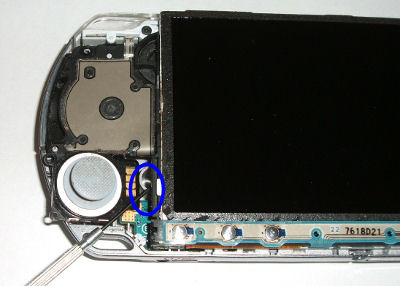
| Step 3. Remove the faceplate and locate the PSP 2001 Analog Assembly. It is held into the console by 1 black screw, as circled in the picture. |
|
|

| Step 4. Remove the black screw and pry the joystick out of the PSP as shown below. |
|
|
| Step 5. It is important that you remove this clear silicon piece from the old joystick and install it into the new one. Its purpose is to communicate the movement of the joystick from the assembly to the motherboard. It sits between the assembly and the motherboard. |
|
|

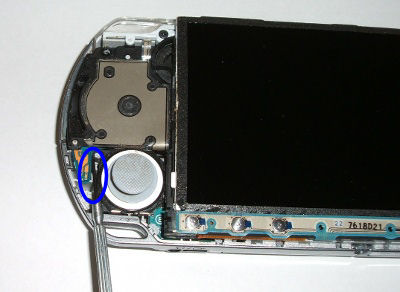
| Step 6. After you transfer the piece, pry the motherboard slightly up as you slide the new assembly back in place as pictured. |
|
|

| Step 7. You will need to pry this piece up to slide the assembly into place so that it is seated. Replace the black screw and close it back up. |
|
|
 Regular price: $20.00 Sale price: $12.95 |  Regular price: $6.95 Sale price: $4.95 |  Regular price: $19.95 Sale price: $16.95 |
Questions? Comments? Need help ordering?

| WE APPRECIATE YOUR BUSINESS! |
|